 minipic.me
Retro handheld pixel avatar
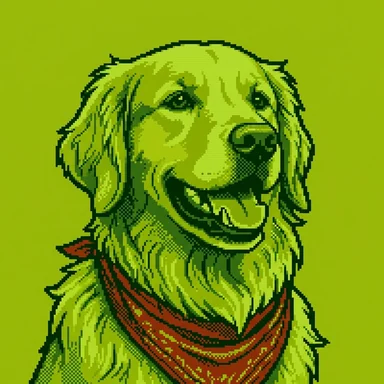
Four shades of green and nothing else. Your avatar looks like it is glowing on the screen of a pocket console from 1989, batteries nearly flat.
From a selfie or a sentence, in about ten seconds. No card needed.
Handheld examples
Each of these was drawn from one line of text, shown under it. Type your own, or add a selfie instead.


What makes it Handheld
Exactly four shades
From near-black olive to pale pea green: the whole palette of the early handheld screens.
Chunky sprites
Big pixels and simple shapes that read at any size.
Instantly nostalgic
Anyone who played in the back seat of a car on a long drive will recognise it.
Framed for a profile picture
Head and shoulders, centred like a passport photo, so it sits right in a round or square avatar slot.
How to make one
- Pick Handheld. The button on this page opens minipic.me with Handheld already chosen.
- Add a selfie or a sentence. One face in good light, looking at the camera, works best. Or describe anyone (or anything) in a few words.
- Keep it. Download PNG or WebP from 64 to 1024 pixels, with the background kept or cut out to transparent, or tweak it ("add a red scarf").
Great for
- Retro gaming profiles
- Chiptune and music channels
- Team avatars that all share one palette
- Minimal, low-colour profile pictures
- Pixel art prints and stickers
Questions
Why only green?
That is the charm: early handheld screens could only show four shades of green. Every avatar in this style shares the same palette, so a whole team or friend group looks consistent.
Can I change the colours?
Handheld always uses its four greens. For a different palette, try 8-bit or Cyberpunk.
Is it free?
Your first two avatars are free, no card needed. After that, your first pack is $5 for 12 avatars, then packs start at $9 for 20, and credits never expire.
Do you keep my photo?
A photo you add to draw once is used for that drawing and not kept. Photos you save in People are kept privately until you delete them or your account.
 8-bit
8-bit Kawaii
 Polygon